
In order to send out notifications on time, modern applications depend on effective communication mechanisms. Finding your way around the vast world of message queue systems can be challenging. This guide offers a step-by-step process for choosing the best message queue technology to power your notification system, ensuring smooth communication and top efficiency.
Understanding Your Requirements: Key Factors to Consider
When choosing the right message queue technology for your notification system, there are several key factors to consider. In this section, we'll explore some of the most important ones, along with real-world notification use cases to help illustrate their significance.
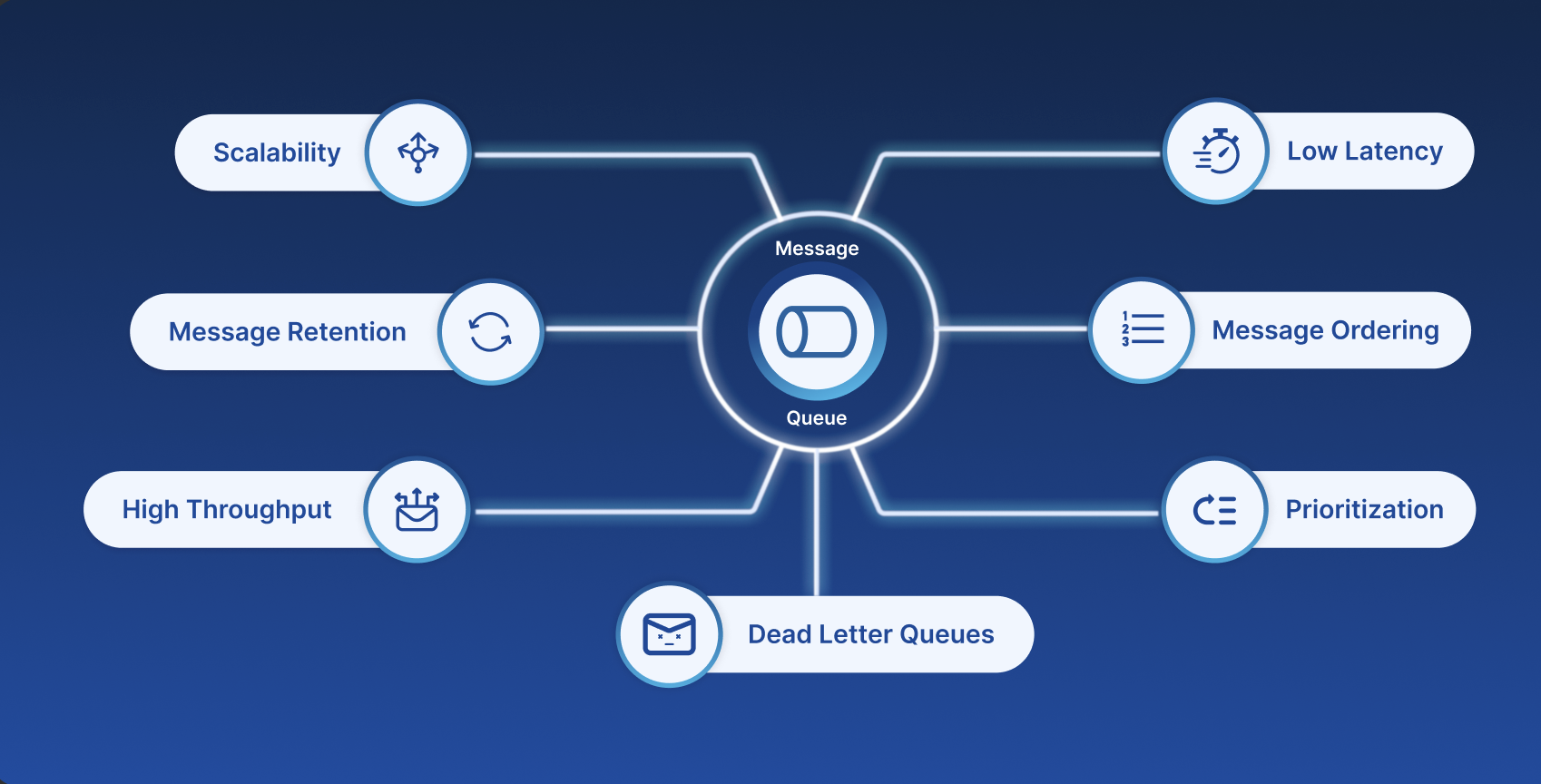
Scalability
Imagine you're building a mobile app that sends push notifications to users when their favorite sports team scores a goal. As the app gains popularity, the number of notifications sent per minute increases exponentially. A message queue technology that can scale horizontally and vertically will ensure that your app can handle the increased load without affecting performance.
Message Retention
Suppose you want to send transactional notifications to users whenever a significant financial transaction occurs in their account. You typically send these notifications in real-time when a transaction occurs. However, one day, the consumer experiences a temporary outage due to a server issue. During this time, the message queue is processed, but notifications are not sent. Without message retention, the notifications would be discarded from the queue, and users would miss important updates about their accounts.
With message retention, instead of discarding notifications from the queue when the consumer is unavailable, the notifications are retained in the message queue. The retention period can be set based on the needs of your application, such as 1 hour, 1 day, or even longer. When the consumer is up again, all the retained messages in the queue can be re-processed again, ensuring critical transactional notifications are still delivered to users during the consumer outage.
Low Latency
A financial institution uses a low-latency message queue like Redis Pub/Sub to notify its fraud detection team of potential security threats in real-time. Whenever a suspicious transaction is detected, the system sends a notification to the message queue, which instantly alerts the team's mobile devices. The low-latency message queue ensures that notifications are delivered promptly, enabling the team to react swiftly and effectively to potential security breaches.
High Throughput
A food delivery app that sends notifications to customers about order status changes (e.g., "Your order is being prepared," "Your order is on its way") requires a high-throughput message queue. Technologies like Apache Kafka or Amazon Kinesis can handle large volumes of messages and distribute them efficiently across multiple consumers, ensuring timely updates for hungry customers.
Message Ordering
In a financial trading platform that sends real-time market alerts to users, message ordering is critical. If the alerts arrive out of sequence, users might miss opportunities or make incorrect investment decisions. Partitioning messages within a queue, as offered by Kafka, helps maintain message ordering and ensures that users receive notifications in the correct order.
Prioritization
In a healthcare setting, a patient's vital signs monitoring system sends notifications to nurses and doctors when certain thresholds are met (e.g., heart rate exceeds 100 bpm). Critical notifications must be delivered promptly to prevent adverse events. Message prioritization in Kafka, combined with strong message ordering, ensures that urgent notifications are processed and delivered first, protecting patient safety.
Dead Letter Queues
An e-commerce website sends order confirmation emails to customers but encounters a high bounce rate due to invalid email addresses. Without a dead letter queue, undeliverable messages would cause errors and slow down the entire system. By implementing a separate dead letter queue, you can isolate and analyze failed deliveries, improving overall system performance and identifying potential issues.
By considering these key factors and using relevant notification-specific use cases, you can choose the best message queue technology for your notification system, ensuring it meets your performance, scalability, and reliability needs.
Exploring Popular Message Queue Technologies for Notifications
Several well-known message queue methods stand out when developing notification systems that require effective and dependable communication between components. In this section, we will compare between different message queue technologies.
| Features | RabbitMQ | Apache Kafka | AWS SQS | Google Cloud Pub/Sub | Amazon Kinesis |
| Message Processing and Management | |||||
| Messaging Model | AMQP | Publish-Subscribe | Push-Pull | Publish-Subscribe | Publish-Subscribe |
| Messaging Retention | Configurable | Configurable | Configurable | Configurable | Configurable |
| Message Ordering | Sequential | Partial-Ordered | FIFO | Unordered | Partial-Order |
| Performance and Scalability | |||||
| Latency | Varied according to Configuration | Low | Low | Low | Low |
| Throughput | Moderate to High | High | High | High | High |
| Scalability | Distributed Scalable | Highly scalable | Automatically scales with AWS | Highly scalable | Highly Scalable |
| Dead Letter Queues | |||||
| Handling Failed Messages | Retry mechanism, optionally move to Dead Letter Exchanges | Retry and process records with offset commits | Retry with visibility timeout, optional DLQs | Retry mechanism, application-level dead-letter | Retry mechanism, application-level dead-letter handling |
| Dead Letter Queues | Supported through Dead Letter Exchange | Custom Support | Not Supported | Yes | Not Supported |
| Message Transformation | |||||
| Transformation Options | Yes | Custom | Limited | Custom | Yes |
| Data Enrichment | Yes | Custom | Limited | Custom | Custom |
| Message Formats | |||||
| Message Formats | Customizable | Usually Binary | JSON, XML | Binary, Text (Custom) | Customizable |
| Payload Size | Configurable | Large (often in MBs) | 256 KB - 256 KB | 10 MB (Standard) | Configurable |
| Cost and Pricing | |||||
| Pricing Structure | Self-hosted (No direct cost) | Self-hosted (Infrastructure cost) | Pay-as-you-go (Per-request, data transferred) | Pay-as-you-go (Per-request, data volume) | Pay-as-you-go (Per-request, data volume) |
| Free Tier | Yes (for self-hosted) | Yes (open-source) | Yes (limited usage) | Yes (limited usage) | Yes (limited usage) |
| Integrations | |||||
| Database Integrations | Possible through custom applications | Possible through custom applications | Not directly supported | Possible through custom applications | Possible through custom applications |
| Cloud Service Integration | Integration possible but may require custom development | Integration possible but may require custom development | Integration through Kafka Connect and other connectors | Seamless integration with Google Cloud services | Integration with various AWS Services |
| Reliability | |||||
| Data Persistence | Yes | Yes | Yes | Yes | Yes |
| Data Replication | Clustering | Replication | Replication | Replication | Replication |
| Redundancy | Fault-Tolerant | Fault-Tolerant | Availability Zones | Fault-Tolerant | Availability Zones |
| Security | |||||
| Encryption | SSL/TLS | SSL/TLS | SSL/TLS | SSL/TLS | SSL/TLS |
| Access Control | Fine-grained access control through vhosts | ACLs | AWS Identity and Access Management (IAM) | Google Cloud Identity and Access Management (IAM) | AWS Identity and Access Management (IAM) |
| Compliance | Depends on deployment | Compliance needs to be managed at higher levels | Compliance varies based on AWS service offerings | Compliance varies based on Google Cloud service offerings | Compliance varies based on AWS service offerings |
| Monitoring Tools | |||||
| Monitoring Tools | RabbitMQ Management Plugin | Third-party tools | Amazon CloudWatch | Stackdriver Monitoring | Amazon CloudWatch |
| Management Console | RabbitMQ Management UI | Third-party tools | AWS Management Console | Google Cloud Console | AWS Management Console |
| Metrics | Provided through Management Plugin | Third-party tools | Available in CloudWatch | Available in Stackdriver Monitoring | Available in CloudWatch Logs and Metrics |
Example Use-Cases: Which message broker to use?
Use Case 1: Startup with Low Volume Transactional Notifications
Recommendation: RabbitMQ
RabbitMQ is a good choice for startups with low volume transactional notifications because it offers a simple, lightweight messaging solution that is easy to set up and manage. It also has a flexible architecture that allows for easy scaling as the startup grows. Additionally, RabbitMQ has a large community of developers who contribute to its development and provide support, making it a cost-effective option.
Use Case 2: Mid-Sized Company with High Volume Notifications and Low Latency Requirements
Recommendation: Apache Kafka
Apache Kafka is a good choice for mid-sized companies with high volume notifications and low latency requirements because it offers a distributed, publish-subscribe model that can handle high throughput and provides low-latency communication between microservices. It also supports fan-out patterns, which allow a single message to be sent to multiple subscribers, making it well-suited for real-time data streaming and event-driven architectures. Additionally, Kafka provides strong guarantees for message delivery and replication, ensuring that messages are not lost or duplicated.
Use Case 3: Enterprise with Complex Notification Workflows and Multiple Microservices
Recommendation: Amazon Kinesis
Amazon Kinesis is a good choice for enterprises with complex notification workflows and multiple microservices because it offers a fully managed, scalable, and secure messaging service that can handle large volumes of data. It also integrates seamlessly with other Amazon Web Services (AWS) products, such as AWS Lambda, AWS Glue, and AWS SageMaker, allowing for easy integration with existing systems. Additionally, Kinesis provides real-time processing and analytics capabilities, enabling businesses to react quickly to changing conditions and make data-driven decisions. Its ability to handle large amounts of data and scale up or down as needed makes it a cost-efficient option for enterprises.
Assessing Your Needs: A Decision-Making Framework
To assist you in evaluating your needs, examine trade-offs, and account for things like learning curves, setup complexities, and monitoring easiness, this blog provides a thorough approach. By using this framework, you'll be able to make well-informed choices that match technology with your particular needs, assuring effective implementation and optimum performance in the fast-paced tech industry of today.
Step 1: Identify Your Needs
Outline in detail the message volume, latency, reliability, scalability, and integration requirements for your notification system.
Step 2: Examine Throughput vs. Latency
Choose between low latency and high throughput for your notification system, as different technologies are better in certain areas.
Step 3: Consider Scalability
Calculate the anticipated expansion of your user base and communication volume. Select a technology that can expand horizontally to meet rising demand.
Step 4: Evaluation of Integration Needs
Think about the software you now use, the programming languages you use, and the frameworks you use. Pick a message queuing system that integrates well.
Step 5: Go through Use Cases
Examine the use cases for your notification system. Does it require point-to-point communication or disseminating messages to numerous users?
Step 6: Check for Cloud Compatibility
If you're using a cloud platform, be sure the message queue technology works well with the services offered by your cloud provider for simple deployment and administration.
Step 7: Analyze the complexity and usability
Think about your team's learning curve, configuration complexity, and ease of monitoring and troubleshooting. Choose a technology complementing your staff's skills.
Step 8: Give Security and Reliability Priority
It is essential to have security features like message durability, access control, and data encryption. Pick a messaging system that offers dependable message delivery.
Step 9: Budgetary Factors
Within your financial limits, calculate the costs associated with implementing and maintaining the selected message queue system.
Step 10: Take Up Future Development
Consider your notification system's future needs and make sure the technology you choose can support them.
Step 11: Examine Community and Support
Seek out technologies with a thriving community, in-depth guides, and dependable customer service.
Step 12: Test and prototype
To assess the actual performance of various message queue technologies, think about developing a prototype or performing performance tests.
Step 13: Get Professional Opinions
If necessary, get advice from seasoned engineers or developers who have first-hand experience working with the technologies that made the shortlist.
Low Latency V/S High Throughput: How To Prioritize?
Low latency and high throughput are both important characteristics of a message queue technology, but they often come at the expense of each other. In other words, optimizing for low latency can lead to lower throughput, and vice versa.
One reason for this trade-off is that low latency requires the message queue technology to have fast ingestion and egress rates, which can lead to higher resource utilization (e.g., CPU, memory, network bandwidth). On the other hand, high throughput requires the ability to process large volumes of messages, which can lead to increased latency as the system struggles to keep up with the load.
Another reason is that some message queue technologies are designed with different use cases in mind. For example, RabbitMQ is designed for low-latency, real-time applications, whereas Apache Kafka is designed for high-throughput, distributed streaming.
Therefore, choosing between low latency and high throughput depends on the specific requirements of the application. If real-time updates are critical, low latency may be the better choice. But if the application requires processing large volumes of data, high throughput may be more important. It's worth noting that some message queue technologies, such as Apache Kafka, offer configurable settings that allow for a balance between low latency and high throughput. However, even in these cases, there may still be limitations imposed by the underlying hardware and software architecture.
Considerations for Hybrid and Multi-Cloud Environments
Some considerations for Hybrid and Multi-Cloud Environments are:-
- Multiple Message Queue Technology Management: Different components of your application may make use of various message queue technologies in hybrid and multi-cloud settings. Make certain that your team is skilled at managing and maintaining these technologies.
- Ensure consistency and interoperability: Pick message queue technologies that are compatible with various situations. Look for generally applicable standardized protocols, such as AMQP or MQTT. To prevent fragmentation, use uniform message patterns and procedures across all systems.
- Taking Care of Potential Complexities and Trade-Offs: Due to the requirement for cross-environment connectivity, hybrid and multi-cloud solutions may add complexity. Analyze the trade-offs between flexibility's advantages and complexity.
Conclusion and Next Steps
The key to creating a successful notification system is selecting the right message queue technology that fits your unique needs, design, and objectives. We've looked at important variables to think about well-liked message queue technologies, and essential considerations for hybrid and multi-cloud environments throughout this guide.
Decisions will be influenced by a variety of project-specific variables. Finding the right mix between performance, dependability, usability, and ecosystem compatibility is crucial. As your application develops, periodically re-evaluate the requirements for your notification system.
Liked the article? Check out SuprSend to easily integrate the best message queue technology in your notification system without writing any code.
About the author
Developer from SuprSend.
Comments
Join the discussionNo comments yet. Be the first to comment.


