
I set out to tackle a common issue faced by users of social media and collaborative platforms: notification fatigue. Inspired by the notification strategies employed by major platforms like LinkedIn, MS Teams, and Google Workspace, I aimed to create a tutorial demo application that demonstrated the power of batching notifications. This batching technique consolidates multiple alerts into a concise summary within a single notification, reducing interruptions and creating a clutter-free user experience.
You can explore the hands-on implementation through the following links:
GitHub: SuprSend Social App
Deployed Application: SuprSend Demo
More on Batching: Batch (suprsend.com)
The Challenge
Frequent notifications can overwhelm users, leading to disengagement. Batching notifications helps maintain user attention and promotes sustained interaction. However, developing an efficient batching system involves sophisticated workflows and substantial development effort.

The Concept
Here’s a breakdown of the key components involved in batching notifications:
Aggregation Engine:
Aggregates related notifications (e.g., likes, shares, comments) based on metadata.
Example: Instagram separates story likes and comments to ensure clarity.
Batching Window:
Can be fixed (e.g., every 30 minutes) or dynamic (e.g., user-specific intervals).
Example: LinkedIn batches email alerts for new messages every 30 minutes, while Google Docs batches comments based on user activity.
Scheduling:
Determines the optimal time for delivering notifications.
Example: SaaS companies often send a daily digest of activities the following morning.
Batched Message Presentation:
Options range from simple counters to detailed summaries, balancing informativeness and engagement.
Example: "Patrick and 3 others liked your photo" versus listing all activities.
Cancelling Aggregation:
Adjusts the aggregation counter for counter-activities within the batching window.
Example: If a user likes and then unlikes a post within the batching window, the counter is adjusted accordingly.
Building the Demo Application
To bring this concept to life, I decided to build a React application using SuprSend's notification infrastructure. Here’s how I did it:
Project Setup:
Created a React application and integrated SuprSend's SDK (React and JS)
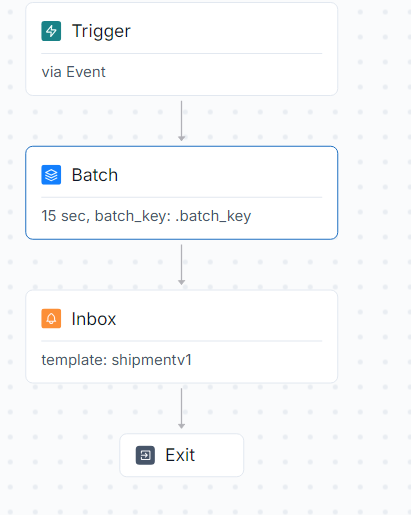
Set up a SuprSend account and ensured successful event calls with the necessary details. Here's how the notification workflow for this project looks like:
Identifying Triggers:
Identified recurring events suitable for batching. For this demo, I used the
Like_Eventwhenever someone likes a post. Using SuprSend’s JavaScript SDK, I sent these events to the backend.
Code Snippet used:

Configuring Batch Parameters:
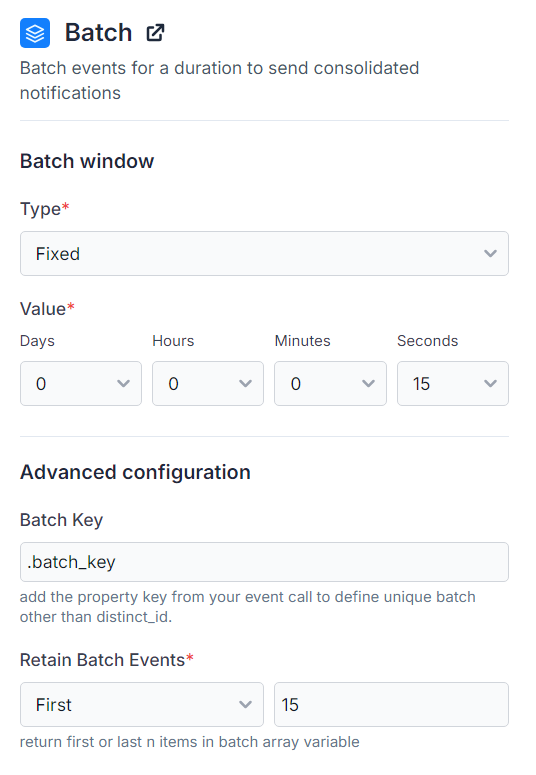
Configured batch parameters using SuprSend’s workflow builder:
Batch Window: Set a fixed batch window of 15 seconds for quick testing.
Batch Key: Defined a custom batch key based on the userName variable to batch likes on different posts separately.
Retain Batch Events: Retained 15 objects in the array for this demo.
Creating Notification Templates:
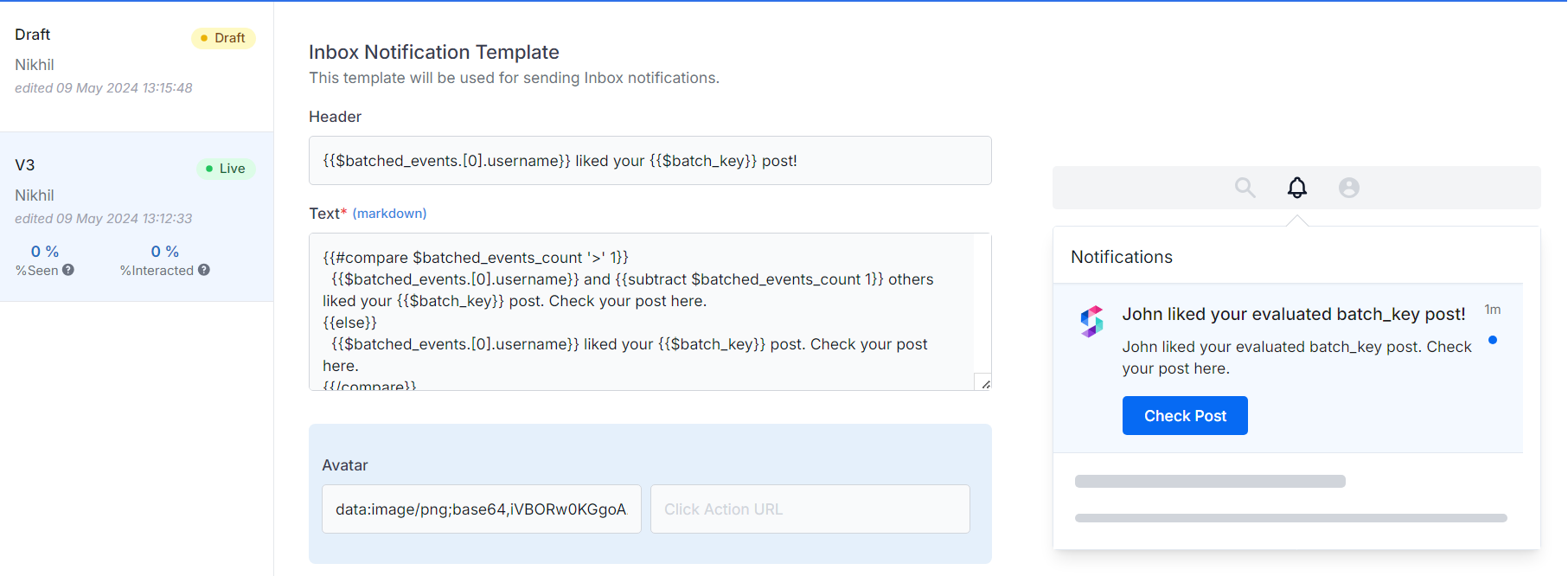
Created templates in SuprSend’s editor using Handlebar Helpers to format notifications based on the batched event count. The template looked like this:
  {{#compare $batched_events_count '>' 1}}
  {{ $batched_events.[0].username }} and {{ subtract $batched_events_count 1 }} others liked your post.
  {{else}}
  {{ $batched_events.[0].username }} liked your post.
  {{/compare}}
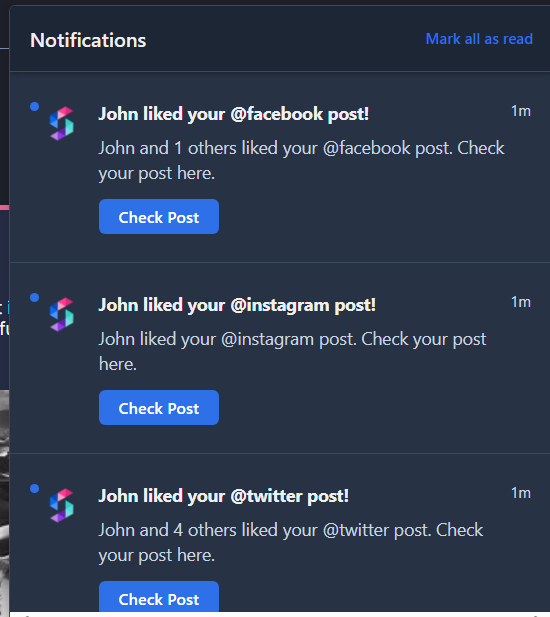
Final result?
Implementing Throttling
To further enhance the user experience, I introduced throttling to limit the frequency of notifications. By setting an upper limit on daily notifications, users are not overwhelmed even with multiple batches. I will discuss this in the next post.
The Result
The final demo application successfully demonstrated the benefits of batching notifications in maintaining user engagement. You can explore the hands-on implementation through the following links:
GitHub: SuprSend Social App
Deployed Application: SuprSend Demo
About the author
Developer from SuprSend.
Comments
Join the discussionNo comments yet. Be the first to comment.


